Your cameras,
under your control.

The free app for Windows and Linux. Connect your USB and IP cameras and monitor them directly from your own computer.

↓ Download Desktop Client
WINDOWS LINUX MACOS SOON
🔒 100% local — your streams never leave your computer unless you opt into the cloud
FREE DESKTOP APP

Your cameras, managed
from your own computer.

Install mivisus on Windows or Linux. Connect your USB and IP cameras and manage them directly from your machine. Simple to set up, no technical knowledge required.

Download Desktop Client
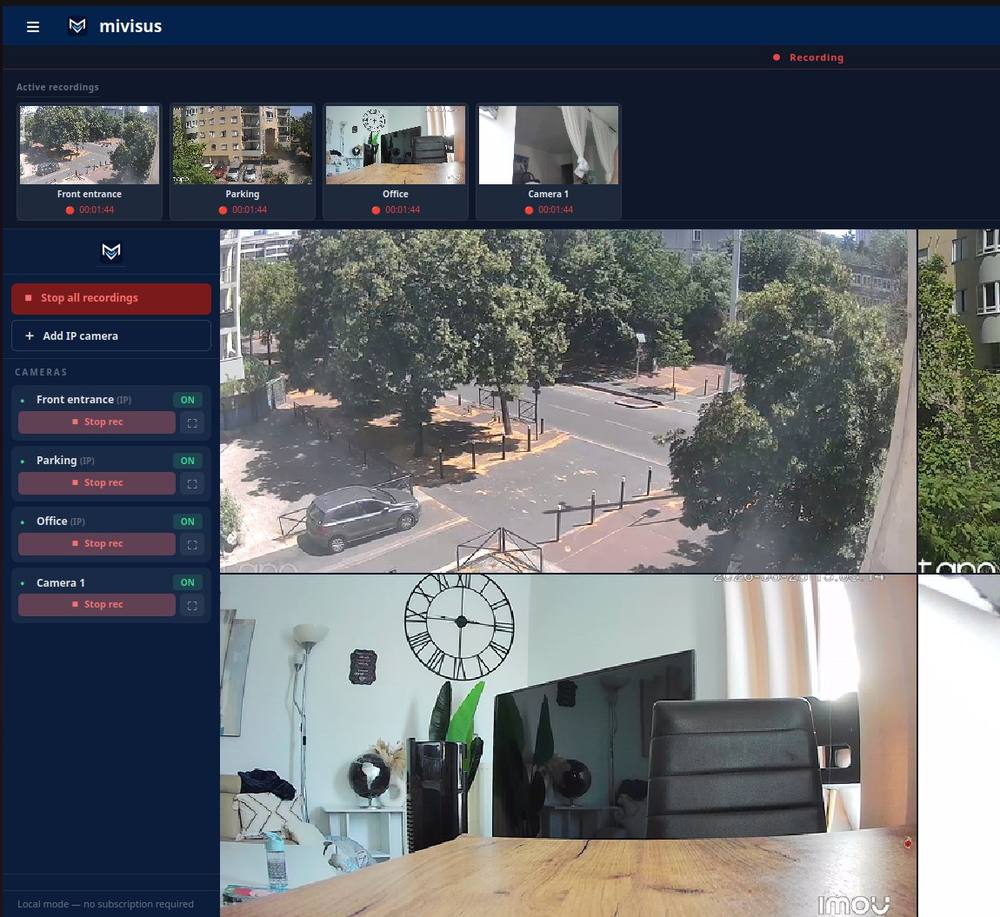

Mivisus — application desktop
Free No account required
Windows + Linux Desktop app available
Any browser No viewer app needed
24/7 Always accessible
FEATURES

Everything you need, built into one free app.

All your cameras, one free app. No hardware, no maintenance, no limits.

USB & IP cameras
Connect any standard USB webcam or RTSP-compatible IP camera through the mivisus desktop client.
UVC · RTSP · ONVIF
Quick and easy setup
Install mivisus and connect your cameras in minutes. USB webcams are detected automatically.
WINDOWS · LINUX
Live camera view
See all your cameras in real time, directly on your computer. No complicated configuration needed.
REAL-TIME · LOW LATENCY
24/7 always available
Your cameras keep streaming round the clock. Watch live or check on them whenever you need.
RELIABLE · NO INTERRUPTION
SEE IT IN ACTION

Watch mivisus in 3 minutes.

Add cameras, record, stream live — see exactly how it works.

ALSO INCLUDED

Remote view of your cameras, whenever you want it.

mivisus.com/cameras
6 online 142.3 GB stored
Mivisus — tableau de bord caméras
START TODAY

Install mivisus free in minutes.

Works directly on your computer.

WINDOWS LINUX MACOS SOON